NIO(non-blocking IO) 是 java 1.4 引入的新的 I/O 模型,相对于传统 IO,它的优势是非阻塞式的。
CS 模式的演变
要说明为什么需要 NIO,需要阐述 CS(Client-Server)模式的网络通信的演变。
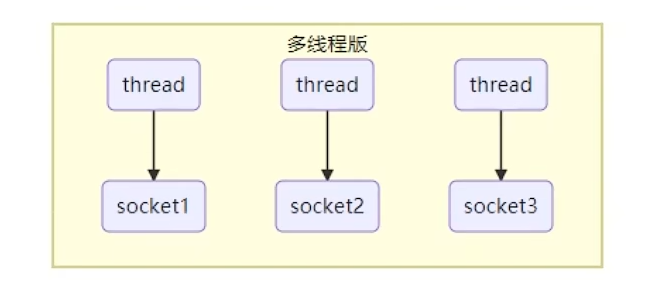
当服务端和客户端建立 socket 连接后,服务端启动一个单独的线程负责处理这个连接,直到任务完成,客户端断开连接。
如果连接数不多,这样的模式是可行的,因为单独的线程处理客户端请求,响应快延迟低。但如果连接数很多,就会在服务端产生大量的线程,进而消耗大量的内存,可能导致内存溢出。并且因为线程数远高于 CPU 的核心数,会有频繁的线程切换开销。
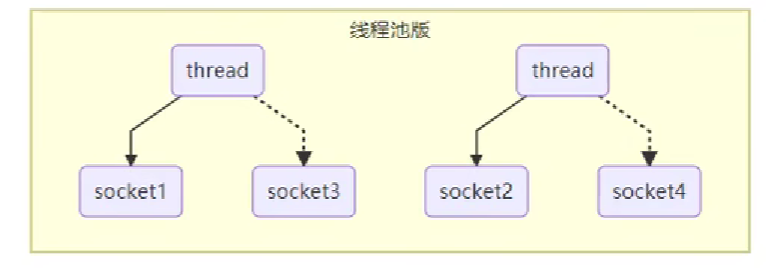
进一步优化后的方案是使用线程池,服务端使用线程池的好处是最大线程数是有上限的,不会因为无限制产生线程而耗尽服务端硬件资源,但缺点依然存在,即每个线程依旧需要等待完成客户端任务后才能断开连接,以为下一个客户端的连接服务。当客户端请求数远高于服务端线程池的最大数目时,大多数连接都只能处于等待线程空闲的情况。
对于某些场景,这样是没有问题的,比如 HTTP 请求,TCP 请求很简单,只需要发送请求报文到服务端,然后就可以断开连接。但交互式的场景就存在问题,比如游戏,客户端与服务端建立连接后,需要多次交互才能完成一个工作,此时服务端线程就无法处理其他客户端的请求,就会导致性能低下。
如果使用 NIO 的方案:
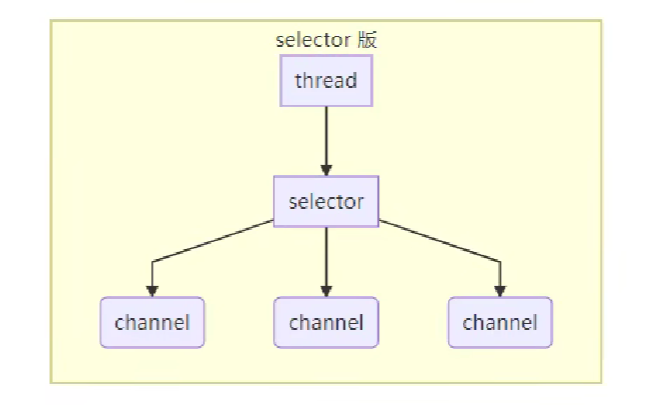
服务端和客户端的数据读写不再通过阻塞的 Socket,而是通过非阻塞的 channel,客户端可以在任意时候读写数据,一旦 channel 中有数据读写,就会产生相应的事件,selector 可以观察到这些事件,并告知 thread,thread 就可以做出相应的处理。
在这种模式下,服务端可以用少量的线程处理大量的客户端请求,I/O 不再是程序性能的瓶颈。
这种方式很像 Python/Go 中的协程,依然是解决 I/O 阻塞的瓶颈,释放 CPU 计算资源的思路。对于提升 I/O 密集型任务的性能很有帮助。
对于数据吞吐型任务,比如上传下载,这样做是没有性能提升的。
核心组件
channel有一点类似于stream,它就是读写数据的双向通道,可以从channel将数据读入buffer,也可以将 buffer的数据写入channel,而之前的stream要么是输入,要么是输出,channel比stream更为底层。

常见的 Channel 有:
-
FileChannel,用于文件读写
-
DatagramChannel,用于 UDP 连接
-
SocketChannel,用于 TCP 连接(服务端或客户端)
-
ServerSocketChannel,用于 TCP 连接的服务端
常见的 Buffer 有:
-
ByteBuffer
-
MappedByteBuffer
-
DirectByteBuffer
-
HeapByteBuffer
-
-
ShorBuffer
-
IntBuffer
-
LongBuffer
-
FloatBuffer
-
DoubleBuffer
-
CharBuffer
Channel 和 ByteBuffer 的使用
用一个示例说明 Channel 和 ByteBuffer 的使用方式:
先创建一个测试文件test.txt:
123456789@123
创建测试用例:
final String filePath = "D:\\workspace\\learn-netty\\ch1\\netty-demo\\src\\test\\resources\\test.txt";
// 创建一个从文件读取数据的通道
try (FileInputStream fileInputStream = new FileInputStream(filePath)) {
    FileChannel channel = fileInputStream.getChannel();
    // 创建缓冲区
    ByteBuffer buffer = ByteBuffer.allocate(10);
    while (true) {
        // 从通道读取数据到缓冲区
        int read = channel.read(buffer);
        if (read == -1) {
            // 缓冲区中已经没有数据
            break;
        }
        // 从缓冲区读取内容并打印
        buffer.flip(); // 切换为读模式
        while (buffer.hasRemaining()) {
            log.info("{}", (char) buffer.get());
        }
        buffer.clear(); // 清空缓冲区(将缓冲区切换回写模式)
    }
}
示例中演示了怎么通过 NIO 的方式从文件中读取数据。程序主体与传统 I/O 类似,都是循环的方式从输入流(或 Channel)中将数据读取到缓冲区,然后输出到屏幕。区别在于,传统 I/O 中我们使用简单的字节数组(char[])作为缓冲区,只需要单纯读或者写即可,但 NIO 使用 ByteBuffer 作为缓冲区,可以“同时”读写。也就是说可能服务端只读取了一部分数据,客户端就开始新的写入操作。为此,ByteBuffer 进行了特殊设计,这就是为什么示例代码中需要使用buffer.flip()和buffer.clear()切换 ByteBuffer 的模式。
ByteBuffer 原理
ByteBuffer 有以下几个重要属性:
-
capacity,ByteBuffer的最大容量
-
position,当前指针(或游标),表示当前读写的位置
-
limit,当前读写的最大范围
在最初时:
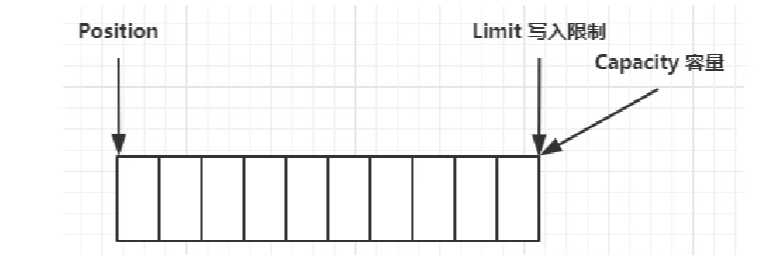
如果写入数据:
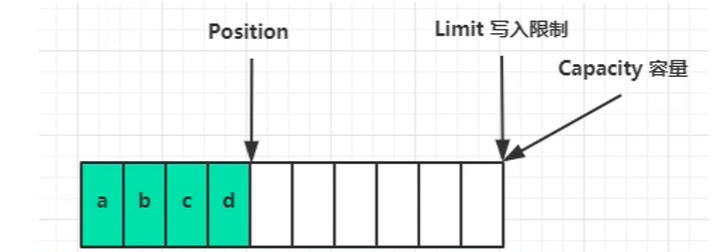
此时如果需要读取写入的数据,可以执行flip方法切换到读模式,此时:
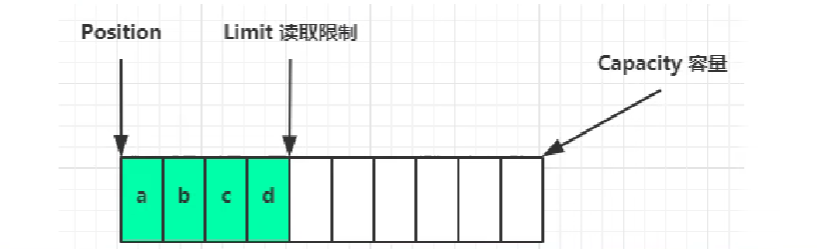
读取 4 个字节后:
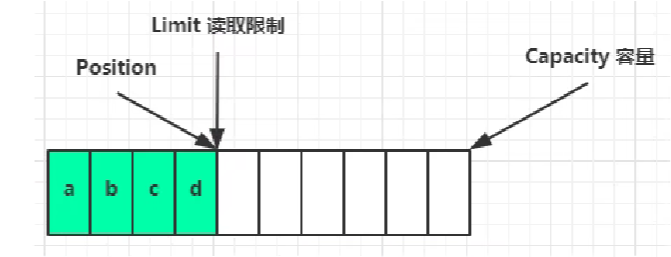
此时为了不影响下次正常写入,需要执行clear方法:
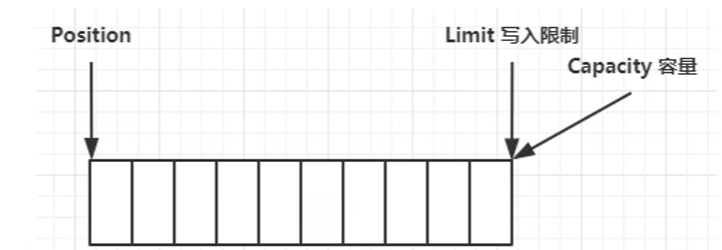
此时 ByteBuffer 恢复到最初状态,可以从头写入数据。
正如之前所说,除了上面的一般情况,ByteBuffer 是有可能出现间隔读写的情况的,比如:
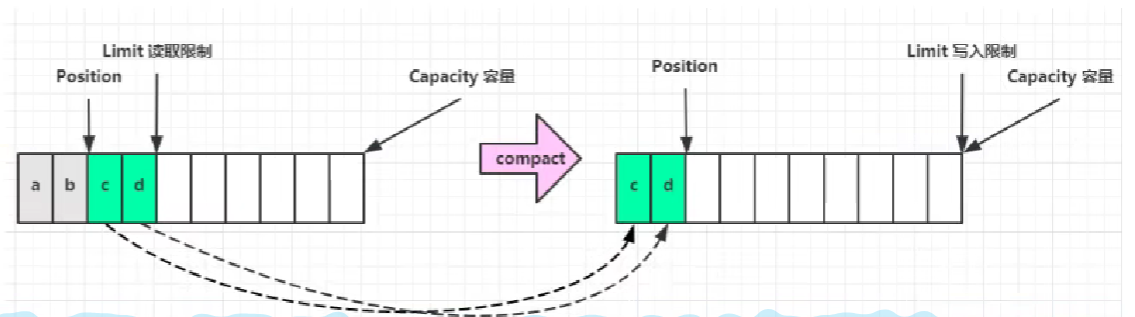
上图表示服务端读取了前两个字节后客户端又要写入数据,这时候就可以执行compact方法,将前两个字节删除,然后移动剩余字节到开头部分,重新调整指针到剩余字节的尾部,这样就可以在不影响剩余数据的情况下进行写入操作。
上述操作可以通过一个简单示例验证:
ByteBuffer buffer = ByteBuffer.allocate(10);
buffer.put((byte) 0x61);
buffer.put((byte) 0x62);
buffer.put((byte) 0x63);
ByteBufferUtil.debugAll(buffer);
buffer.flip();
ByteBufferUtil.debugAll(buffer);
System.out.println((char) buffer.get());
ByteBufferUtil.debugAll(buffer);
buffer.compact();
ByteBufferUtil.debugAll(buffer);
buffer.put(new byte[]{(byte) 0x64, (byte) 0x65});
ByteBufferUtil.debugAll(buffer);
这里的 是一个用于打印 ByteBuffer 结构的工具类。
ByteBuffer 常见方法
分配空间
为 ByeBuffer 分配空间有两种方法:
ByteBuffer buffer1 = ByteBuffer.allocate(10);
ByteBuffer buffer2 = ByteBuffer.allocateDirect(10);
System.out.println(buffer1.getClass());
System.out.println(buffer2.getClass());
结果:
class java.nio.HeapByteBuffer
class java.nio.DirectByteBuffer
它们返回的对象类型不同:
-
HeapByteBuffer,从 JVM 堆中申请空间,受 GC(垃圾回收)影响,会二次拷贝数据,读写性能较差 -
DirectByteBuffer,从系统内存申请空间,不受 GC 影响,不会二次拷贝数据,读写性能好,存在内存泄漏风险
读写数据
向 ByteBuffer 写入数据:
-
channel.read(buffer),从 Channel 中读取数据并写入 ByteBuffer -
buffer.put((byte) 0x63),向 ByteBuffer 中写入字节
从 ByteBuffer 读取数据:
-
buffer.get(),从 ByteBuffer 中读取字节 -
channel.write(buffer),从 ByteBuffer 中读取数据并写入 Channel
使用 get 方法读取 ByteBuffer 数据时会改变游标(Position)的位置,使用get(i)可以从指定位置读取字节,并不会影响游标的位置:
ByteBuffer buffer = ByteBuffer.allocate(10);
buffer.put(new byte[]{'a', 'b', 'c', 'd'});
buffer.flip();
byte c = buffer.get(2);
System.out.println((char)c);
重置游标
如果需要重置游标并从头读取数据,可以使用rewind方法:
public void testRewind() {
// 写入测试数据
ByteBuffer buffer = ByteBuffer.allocate(10);
buffer.put(new byte[]{'a', 'b', 'c', 'd'});
// 执行读操作
buffer.flip();
print(buffer, 4);
// 重置读指针并从头读取
buffer.rewind();
print(buffer, 2);
}
private void print(ByteBuffer byteBuffer, int n) {
int times = n;
while (times > 0) {
System.out.println((char)byteBuffer.get());
times--;
}
}
rewind方法比较死板,只能将读指针重置到 ByteBuffer 的开头部分,使用mark和reset方法可以更灵活的重置读指针的位置:
// 写入测试数据
ByteBuffer buffer = ByteBuffer.allocate(10);
buffer.put(new byte[]{'a', 'b', 'c', 'd'});
buffer.flip();
// 读取2个字节
print(buffer, 2);
// 标记当前读取位置
buffer.mark();
// 继续读取
print(buffer, 2);
// 重置指针到mark的位置
buffer.reset();
// 读取2个字节
print(buffer, 2);
String 和 ByteBuffer 的转换
将 String 转换为 ByteBuffer,有以下几种方式:
方法一,将字符串转换为字节数组后写入:
private static ByteBuffer str2ByteBuffer(String str) {
    byte[] bytes = str.getBytes();
    ByteBuffer buffer = ByteBuffer.allocate(bytes.length);
    buffer.put(bytes);
    buffer.flip();
    return buffer;
}
注意,写入到 ByteBuffer 后、返回 ByteBuffer 前最好使用flip方法将其设置为读模式,以防止其它程序直接试图从中读取数据导致的错误。
方法二,使用wrap方法:
private static ByteBuffer str2ByteBuffer2(String str) {
    byte[] bytes = str.getBytes();
    return ByteBuffer.wrap(bytes);
}
这里不需要调用
flip方法,因为wrap方法本身就会将 ByteBuffer 设置为读模式。
方法三,利用CharSet:
private static ByteBuffer str2ByteBuffer3(String str) {
    return StandardCharsets.UTF_8.encode(str);
}
这里同样不需要调用
flip方法。方法一中字符串转换为数组时同样可以指定编码方式,没有指定就使用系统默认编码。
将 ByteBuffer 转换为字符串:
private static String byteBuffer2Str(ByteBuffer buffer) {
    return StandardCharsets.UTF_8.decode(buffer).toString();
}
分散读集中写
假设需要读取的文件内容是:
OneTwoThree
需要将其中三个单词分别读入内存进行处理,通常的做法是用一个 ByteBuffer 读取全部内容后再分割为三个单词。但这必然会涉及内存拷贝。更有效率的做法是直接将其读取到三个 ByteBuffer,这种方式被称为分散读:
FileChannel channel = fileInputStream.getChannel();
// 创建缓冲区
ByteBuffer buffer1 = ByteBuffer.allocate(3);
ByteBuffer buffer2 = ByteBuffer.allocate(3);
ByteBuffer buffer3 = ByteBuffer.allocate(5);
channel.read(new ByteBuffer[]{buffer1, buffer2, buffer3});
buffer1.flip();
buffer2.flip();
buffer3.flip();
System.out.println(StandardCharsets.UTF_8.decode(buffer1));
System.out.println(StandardCharsets.UTF_8.decode(buffer2));
System.out.println(StandardCharsets.UTF_8.decode(buffer3));
同样的,如果是多个单词需要合并后写入文件,如果只使用一个 ByteBuffer,同样涉及内存拷贝,使用三个 ByteBuffer 写入的效率更高,这种方式被称作集中写:
ByteBuffer buffer1 = StandardCharsets.UTF_8.encode("One");
ByteBuffer buffer2 = StandardCharsets.UTF_8.encode("Two");
ByteBuffer buffer3 = StandardCharsets.UTF_8.encode("Three");
String filePath = "D:\\workspace\\learn-netty\\ch1\\netty-demo\\src\\test\\resources\\test3.txt";
try(FileOutputStream fileOutputStream = new FileOutputStream(filePath)){
    FileChannel channel = fileOutputStream.getChannel();
    channel.write(new ByteBuffer[]{buffer1, buffer2, buffer3});
}
黏包与半包
黏包指网络编程时,发送方发送的多条数据被一个 ByteBuffer 接收,半包指发送方发送的一条数据被多个 ByteBuffer 接收。
假设客户端发送的消息为:
Hello world\n
How are you\n
你好\n
每条消息结尾用\n作为分隔符,因为某些原因,服务端接收到的消息为:
Hello world\nHow are you\n你
好!\n
测试用例:
// 模拟接受到黏包和半包数据
ByteBuffer buffer1 = StandardCharsets.UTF_8.encode("Hello world\nHow are you\n你");
ByteBuffer buffer2 = StandardCharsets.UTF_8.encode("好!\n");
// 处理黏包和半包数据
List<ByteBuffer> buffers = dealStickPackage(List.of(buffer1, buffer2));
for (ByteBuffer buffer : buffers) {
    System.out.println(StandardCharsets.UTF_8.decode(buffer));
}
完整示例可以看。
文件编程
FileChannel
FileChannel 只能工作在非阻塞模式下,获取 FileBuffer 可以通过三种方式:
-
FileInputStream
-
FileOutputStream
-
RandomAccessFile
前两者只能分别获取到只读或只写的 FileChannel ,RandomAccessFile 可以通过rw模式获取到可读可写的 FileChannel :
// 通过 RandomAccessFile 获取到可读可写的 ByteBuffer
String filePath = DIR_PATH + "\\test.txt";
try (RandomAccessFile randomAccessFile = new RandomAccessFile(filePath, "rw")) {
    FileChannel channel = randomAccessFile.getChannel();
    // 读取并打印
    ByteBuffer byteBuffer = ByteBuffer.allocate(1024);
    int read;
    do {
        read = channel.read(byteBuffer);
        byteBuffer.flip();
        String content = StandardCharsets.UTF_8.decode(byteBuffer).toString();
        System.out.println(content);
        byteBuffer.clear();
    }
    while (read != -1);
    // 写入文件内容
    channel.write(ByteBuffer.wrap("\nhello world\n".getBytes()));
}
不需要显式关闭通道,RandomAccessFile 关闭时会自动关闭通道。
可以通过position获取 FileChannel 读取的当前位置:
long position = channel.position();
可以通过size方法获取文件大小:
long size = channel.size();
出于性能考虑,FileChannel不会立即将数据写入磁盘,可以通过force(true)改变这一行为。
两个 Channel 传输数据
可以将一个 FileChannel 的内容传输给另一个 FileChannel:
// 两个文件通道之间进行数据传输
String srcFilePath = DIR_PATH + "\\source.txt";
String destFilePath = DIR_PATH + "\\target.txt";
try (FileChannel srcChannel = new FileInputStream(srcFilePath).getChannel();
     FileChannel destChannel = new FileOutputStream(destFilePath).getChannel()) {
    srcChannel.transferTo(0, srcChannel.size(), destChannel);
}
可以利用这种方式拷贝文件。需要注意的是,这种方式传输数据有大小限制,最多能传输 2G 内容。对于超过 2G 大小的文件传输,可以用下面的方式:
// 两个文件通道之间进行数据传输
String srcFilePath = DIR_PATH + "\\source.txt";
String destFilePath = DIR_PATH + "\\target.txt";
try (FileChannel srcChannel = new FileInputStream(srcFilePath).getChannel();
     FileChannel destChannel = new FileOutputStream(destFilePath).getChannel()) {
    long position = 0;
    do {
        long transferred = srcChannel.transferTo(position, srcChannel.size(), destChannel);
        if (transferred == 0){
            break;
        }
        position += transferred;
    }
    while (true);
}
Files 和 Paths
创建目录:
String dirPath = DIR_PATH + "\\dir";
Path path = Paths.get(dirPath);
Files.createDirectory(path);
createDirectory只能创建一级目录,如果要创建多级目录,需要:
String dirPath = DIR_PATH + "\\dir\\dir1\\dir2";
Path path = Paths.get(dirPath);
Files.createDirectories(path);
利用Files也可以完成文件拷贝:
Files.copy(Paths.get(DIR_PATH + "\\source.txt"), Paths.get(DIR_PATH + "\\target.txt"));
如果目标文件存在时要覆盖:
Files.copy(Paths.get(DIR_PATH + "\\source.txt"), Paths.get(DIR_PATH + "\\target.txt"), StandardCopyOption.REPLACE_EXISTING);
移动文件:
Files.move(Paths.get(DIR_PATH + "\\test2.txt"), Paths.get(DIR_PATH + "\\test5.txt"));
删除文件:
Files.delete(Paths.get(DIR_PATH + "\\test5.txt"));
删除目录:
Files.delete(Paths.get(DIR_PATH + "\\dir"));
只有目录是空的时才能删除,否则会抛出异常。
遍历目录:
Files.walkFileTree(Paths.get(DIR_PATH), new SimpleFileVisitor<>(){
    @Override
    public FileVisitResult preVisitDirectory(Path dir, BasicFileAttributes attrs) throws IOException {
        System.out.println("=======>dir:" + dir);
        return super.preVisitDirectory(dir, attrs);
    }

    @Override
    public FileVisitResult visitFile(Path file, BasicFileAttributes attrs) throws IOException {
        System.out.println("=======>file:" + file);
        return super.visitFile(file, attrs);
    }

    @Override
    public FileVisitResult visitFileFailed(Path file, IOException exc) throws IOException {
        System.out.println("file:" + file + " error:" + exc);
        return super.visitFileFailed(file, exc);
    }

    @Override
    public FileVisitResult postVisitDirectory(Path dir, IOException exc) throws IOException {
        System.out.println("<=======dir:" + dir);
        return super.postVisitDirectory(dir, exc);
    }
});
walkFileTree方法接收一个 Path 以及一个FileVisitor接口,这是一种迭代器模式,FileVisitor起到迭代器的作用,SimpleFileVisitor是一个该接口的简单实现。
FileVisitor接口的四个方法分别对应:
-
preVisitDirectory,进入目录前调用 -
visitFile,访问文件时调用 -
visitFileFailed,文件访问失败时调用 -
postVisitDirectory,离开目录时调用
可以利用目录遍历的 API 实现一个多级目录删除功能:
// 删除多级目录
Files.walkFileTree(Paths.get(DIR_PATH+"\\dir"), new SimpleFileVisitor<>(){
    @Override
    public FileVisitResult visitFile(Path file, BasicFileAttributes attrs) throws IOException {
        // 删除文件
        Files.delete(file);
        return super.visitFile(file, attrs);
    }

    @Override
    public FileVisitResult postVisitDirectory(Path dir, IOException exc) throws IOException {
        // 删除目录
        Files.delete(dir);
        return super.postVisitDirectory(dir, exc);
    }
});
复制多级目录:
// 复制多级目录
String sourceDir = DIR_PATH+"\\test1";
String targetDir = DIR_PATH+"\\test2";
Files.walk(Paths.get(sourceDir) ).forEach(path -> {
    String targetPath = path.toString().replace(sourceDir, targetDir);
    try {
        Files.copy(path, Paths.get(targetPath));
    } catch (IOException e) {
        e.printStackTrace();
    }
});
这里的Files.walk是另一种遍历目录的 API,它返回的是目录遍历的 Stream,可以用 Stream 相关的 API 进行处理。
网络编程
阻塞
先看一个用 NIO 实现的阻塞式的 CS 架构:
服务端:
// 阻塞模式下的服务器端
ServerSocketChannel serverSocketChannel = ServerSocketChannel.open();
// 绑定监听端口
serverSocketChannel.bind(new InetSocketAddress(PORT));
// 创建用于处理客户端连接的线程池
ExecutorService executorService = Executors.newFixedThreadPool(10);
while (true) {
    // 创建一个与客户端的连接
    log.info("等待客户端连接...");
    SocketChannel socketChannel = serverSocketChannel.accept();
    log.info("客户端已连接,{}", socketChannel);
    executorService.execute(() -> {
        try {
            // 创建一个缓冲区
            ByteBuffer buffer = ByteBuffer.allocate(1024);
            // 读取数据
            log.info("等待客户端数据...");
            int read = socketChannel.read(buffer);
            while (read != -1) {
                buffer.flip();
                byte[] bytes = new byte[buffer.remaining()];
                buffer.get(bytes);
                log.info("从客户端收到消息:{}",new String(bytes));
                buffer.clear();
                read = socketChannel.read(buffer);
            }
            log.info("客户端数据读取完毕");
        }
        catch (Exception e) {
            e.printStackTrace();
        }
    });
}
用于建立连接的ServerSocketChannel和SocketChannel默认都工作在阻塞模式下,因此这里的serverSocketChannel.accept()和socketChannel.read(buffer)都只有在接收到客户端请求/发送数据的时候才会执行并返回结果,否则就会一直阻塞。这也是为什么这里用了多个线程进行处理,主线程负责建立连接,子线程负责接收客户端发送的信息并打印。
客户端:
SocketChannel socketChannel = SocketChannel.open();
socketChannel.connect(new InetSocketAddress("localhost", PORT));
socketChannel.write(StandardCharsets.UTF_8.encode("hello"));
socketChannel.close();
非阻塞
以非阻塞方式实现一个服务端:
ServerSocketChannel serverSocketChannel = ServerSocketChannel.open();
serverSocketChannel.bind(new InetSocketAddress(SERVER_PORT));
// 使用非阻塞模式
serverSocketChannel.configureBlocking(false);
// 持有与客户端连接通道的容器
List<SocketChannel> socketChannels = new ArrayList<>();
// 用于客户端打印的缓存,因为是单线程,可以复用
ByteBuffer msgReadBuffer = ByteBuffer.allocate(20);
while (true) {
    // 尝试建立连接
    SocketChannel socketChannel = serverSocketChannel.accept();
    // 如果获取到连接,返回值是非 null
    if (socketChannel != null) {
        log.info("与客户端建立连接 {}", socketChannel);
        // 使用非阻塞模式
        socketChannel.configureBlocking(false);
        // 添加到连接容器
        socketChannels.add(socketChannel);
    }
    // 遍历连接容器,如果有消息,打印
    for (SocketChannel ss : socketChannels) {
        int read = ss.read(msgReadBuffer);
        // 非阻塞模式下,没客户端没有发送消息,返回 0
        if (read > 0) {
            msgReadBuffer.flip();
            String msg = StandardCharsets.UTF_8.decode(msgReadBuffer).toString();
            log.info("接收到客户端消息:{}, from:{}", msg, ss);
            // 清空缓冲,等待下一次写入
            msgReadBuffer.clear();
        }
    }
}
测试:
List<String> messages = List.of("hello", "hi", "你好");
ClientTestUtil.sendMsgToServerByMultiClients("localhost", SERVER_PORT, messages);
是我添加的一个用于模拟多个客户端并发发送消息到服务端进行测试的工具类。
这样就以非阻塞的方式实现了一个可以处理多个客户端连接请求的服务端,这样做的好处是服务端只使用了一个线程,对内存的消耗小,不会因为服务器需要建立大量的线程而只能处理比较小的客户端并发请求。
Selector
上面的代码有个问题,主线程会以轮询的方式不断检查是否有新的客户端连接请求发生,如果这种连接请求并不频繁(通常都是这样),那大多数情况下都是平白在消耗 CPU 的计算资源。
使用 Selector 可以改善这一点,只有当相应的事件发生才在主线程建立与客户端的连接:
ServerSocketChannel serverSocketChannel = ServerSocketChannel.open();
serverSocketChannel.bind(new InetSocketAddress(SERVER_PORT));
serverSocketChannel.configureBlocking(false);
// 使用 Selector
Selector selector = Selector.open();
// 将 selector 注册到通道
SelectionKey selectionKey = serverSocketChannel.register(selector, 0, null);
// 让 key 关注 accept 事件
selectionKey.interestOps(SelectionKey.OP_ACCEPT);
while (true) {
    // 如果没有关注的事件(这里是 accept)发生,就无限阻塞
    log.info("等待客户端连接请求...");
    selector.select();
    // 有事件发生,处理事件
    // 获取发生的所有事件的 key
    Set<SelectionKey> selectionKeys = selector.selectedKeys();
    // 用迭代器遍历 key 集合
    Iterator<SelectionKey> iterator = selectionKeys.iterator();
    while (iterator.hasNext()) {
        SelectionKey key = iterator.next();
        // 获取 key 关联的 channel
        ServerSocketChannel channel = (ServerSocketChannel)key.channel();
        SocketChannel socketChannel = channel.accept();
        log.info("与客户端建立连接:{}", socketChannel);
    }
}
这里使用迭代器遍历selectionKeys是有意为之,因为肯呢个会在遍历的过程中销毁 SelectionKey(完成处理或手动取消),所以必须通过这种方式遍历而非下标。
此外,如果有事件发生,但事件没有得到处理,外侧的下次循环中selector.select()不会阻塞,比如:
while (true) {
    // 如果没有关注的事件(这里是 accept)发生,就无限阻塞
    log.info("等待客户端连接请求...");
    selector.select();
    // 有事件发生,处理事件
    // 获取发生的所有事件的 key
    Set<SelectionKey> selectionKeys = selector.selectedKeys();
    // 用迭代器遍历 key 集合
    Iterator<SelectionKey> iterator = selectionKeys.iterator();
    while (iterator.hasNext()) {
        SelectionKey key = iterator.next();
        // 不处理事件
    }
}
一旦有客户端连接请求,服务端就会不断输出等待客户端连接请求...,而不会发生阻塞。
除了使用channel.accept()建立连接的方式处理事件,还可以手动取消事件:
while (iterator.hasNext()) {
    SelectionKey key = iterator.next();
    // 手动取消事件
    log.info("手动取消事件:{}", key);
    key.cancel();
}
显然,通常服务端要处理多种类型的事件,比如请求连接和消息接收:
 while (true) {
     // 如果没有关注的事件(这里是 accept)发生,就无限阻塞
     log.info("等待客户端请求...");
     selector.select();
     // 有事件发生,处理事件
     // 获取发生的所有事件的 key
     Set<SelectionKey> selectionKeys = selector.selectedKeys();
     // 用迭代器遍历 key 集合
     Iterator<SelectionKey> iterator = selectionKeys.iterator();
     while (iterator.hasNext()) {
         SelectionKey key = iterator.next();
         // 将当前的 key 从 selectedKeys 中删除
         iterator.remove();
         if (key.isAcceptable()) {
             log.info("accept 事件发生{}", key);
             // accept 事件发生
             // 建立连接
             ServerSocketChannel ssc = (ServerSocketChannel) key.channel();
             SocketChannel sc = ssc.accept();
             log.info("与客户端建立连接:{}", sc);
             sc.configureBlocking(false);
             // 让 sc 被 selector 管理
             SelectionKey scKey = sc.register(selector, 0, null);
             scKey.interestOps(SelectionKey.OP_READ);
         } else if (key.isReadable()) {
             log.info("read 事件发生{}", key);
             // read 事件触发
             // 读取客户端发送的消息
             SocketChannel channel = (SocketChannel) key.channel();
             ByteBuffer byteBuffer = ByteBuffer.allocate(50);
             channel.read(byteBuffer);
             byteBuffer.flip();
             String msg = StandardCharsets.UTF_8.decode(byteBuffer).toString();
             log.info("从客户端接收到消息:{}", msg);
         }
     }
需要注意的是,Selector 的selectedKeys集合并不会主动将其中的 key 在事件处理程序执行完后删除,而是需要手动删除,因此在迭代器中需要添加iterator.remove()。否则每次迭代都会重复处理相同的 key。
具体过程说明可以参考这个
现在如果执行客户端测试,可能出现问题,原因是代码中没有正确处理客户端断开连接的情况。
while (true) {
   	// ...
    while (iterator.hasNext()) {
        // ...
        if (key.isAcceptable()) {
            // ...
        } else if (key.isReadable()) {
            log.info("read 事件发生{}", key);
            // read 事件触发
            // 读取客户端发送的消息
            SocketChannel channel = (SocketChannel) key.channel();
            ByteBuffer byteBuffer = ByteBuffer.allocate(50);
            try {
                int read = channel.read(byteBuffer);
                // 如果返回值是 -1 表示客户端正常断开连接(close)
                if (read == -1){
                    log.info("客户端主动关闭连接{}", channel);
                    key.cancel();
                    continue;
                }
            }
            catch (IOException e){
                // 客户端意外断开,产生一个异常
                log.info("客户端意外断开连接{}", channel);
                e.printStackTrace();
                // 移除事件 key
                key.cancel();
            }
            byteBuffer.flip();
            String msg = StandardCharsets.UTF_8.decode(byteBuffer).toString();
            log.info("从客户端接收到消息:{}", msg);
        }
    }
}
客户端断开连接时,服务端会产生一个 Read 事件,如果是意外关闭连接,channel.read执行时会产生一个IOException异常,如果正常关闭连接,channel.read会返回-1。服务端需要在客户端断开连接后主动消除 key(key.cancel),否则就会因为这个 key 的存在一直在外层循环遍历 Read 事件。



文章评论